Page 1 of 1
How to enable resume, forward, rewind, thumbnails...on F6400

Posted:
Sat Aug 03, 2013 5:34 pmby Awesoft
How to enable resume, forward, rewind, thumbnails...on my Samsung SMART TV F6400?
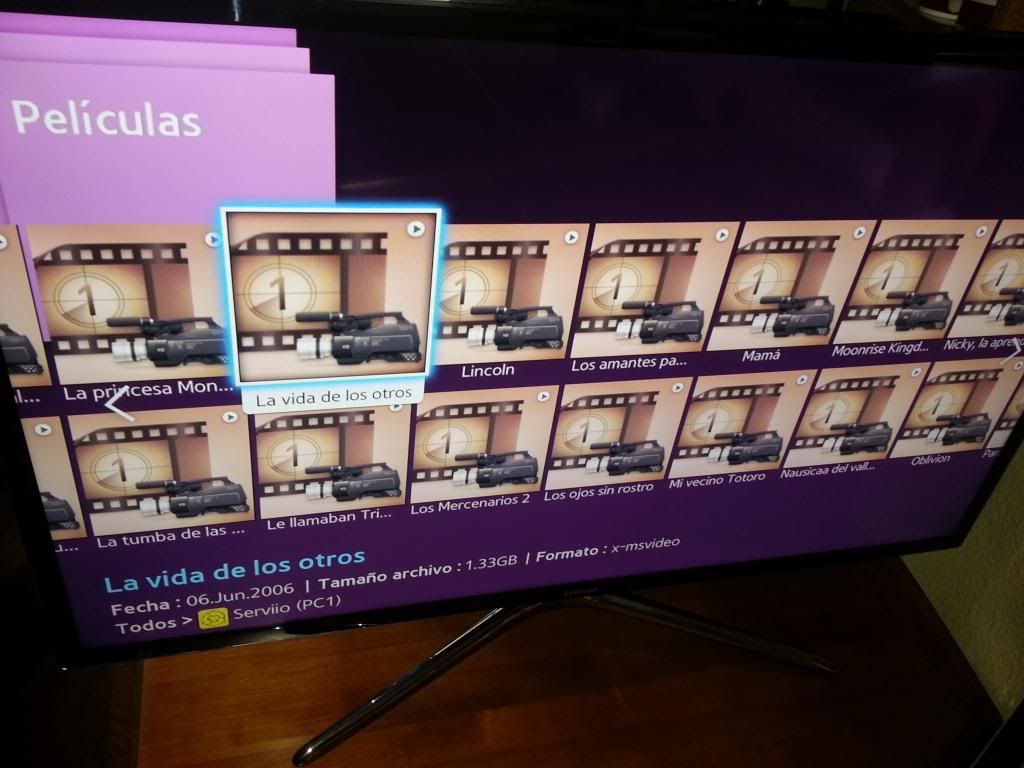
Re: How to enable resume, forward, rewind, thumbnails...on F
Posted:
Sat Aug 03, 2013 10:01 pmby zip
If I remember correctly, thumbnails don't work even with the Samsung's server software on the F series. Which is like the reference implementation.
So you should ask Samsung why they screwed up their firmware

Re: How to enable resume, forward, rewind, thumbnails...on F
Posted:
Sun Aug 04, 2013 11:49 amby Awesoft
zip wrote:If I remember correctly, thumbnails don't work even with the Samsung's server software on the F series. Which is like the reference implementation.
So you should ask Samsung why they screwed up their firmware
The other options I mentioned (go forward, rewind, resume...), should be available as well?
Re: How to enable resume, forward, rewind, thumbnails...on F
Posted:
Sun Aug 04, 2013 12:07 pmby zip
Yes, they work (with non transcoded files) on C, D, and E devices.
Re: How to enable resume, forward, rewind, thumbnails...on F
Posted:
Tue Sep 10, 2013 2:07 pmby Janiporo
So is this forward/rewind not possible on Samsung BD-F5500 Blu-ray player and Serviio 1.3.1? Do you confirm?
EDIT: How about playstation 3?
Re: How to enable resume, forward, rewind, thumbnails...on F
Posted:
Wed Sep 11, 2013 4:48 pmby Janiporo
I borrowed PS3 from my friend and It seems you can go forward but not rewind (with mkv-file, which is transcoded, PS3 won't play it natively)... And on my system you can use only 2x forward. More than that picture freezes. However to get this you have to use the right joysticks, if you press the button, it goes to 1.5x speed, and with the next button push to 10x speed (which does nothing more that freezes the picture). Also the film stopped after about 5 minutes for no reason.
On the other hand, this took VERY little processor power. I have Intel Pentium M processor 740 on my laptop and there was still about 50% of the processor power available with Full-HD file.
Still someone should answer that does this this Samsung BD-F5500 support rewind/forward? Please tell me is F-series supported now.
EDIT: Is there going to be support for this option?
Re: How to enable resume, forward, rewind, thumbnails...on F
Posted:
Wed Sep 25, 2013 11:16 amby RinCEWinG
I also have an F series TV (UE39F5700), and with Serviio I do not see Thumbails and also, and most important, I am not able to make the "Resume" option work.
Am I doing something wrong? Or it is not supported?
Thank you very much
Re: How to enable resume, forward, rewind, thumbnails...on F
Posted:
Wed Sep 25, 2013 4:42 pmby zip
Does the resume option work with All Share server?
Re: How to enable resume, forward, rewind, thumbnails...on F
Posted:
Wed Sep 25, 2013 4:53 pmby RinCEWinG
zip wrote:Does the resume option work with All Share server?
Yes, it does
EDIT! "Resume" feature works now! The thing is that even I set the "Samsung C/D/E/F" profile, it restores automatically to "Generic DLNA". I set the profile while I was watching a Film and now it seems to work!!
Now, only the Thumbnails thing... but it is less important for me than resume option
Thank you for your work!
Re: How to enable resume, forward, rewind, thumbnails...on F
Posted:
Wed Oct 23, 2013 5:10 pmby Awesoft
I tried the latest version of Mezzmo and now I can see the thumbnails.
Any solution for Serviio?

Re: How to enable resume, forward, rewind, thumbnails...on F
Posted:
Tue Nov 19, 2013 12:18 pmby mega999
Hi,
I just got a brand new Samsung UE40F8005 tv and got the exact same thumbnail issue with serviio. Any news on a solution?
Regards!
Re: How to enable resume, forward, rewind, thumbnails...on F
Posted:
Wed Nov 20, 2013 8:09 pmby zip
1.4 should fix thumbnails