Page 1 of 2
Samsung D-series thumbnail stretch

Posted:
Tue Aug 30, 2011 8:17 amby matssee
I just bought a Samsung UE46D5005 and hooked it up to Serviio.
When I browse my movies, the thumbnails are stretched. They're not the correct aspect ratio. It's like they're maximized to use all available space where the thumbnail could be.
I've seen in another post that the C-series might show thumbnails correctly.
Anyone know how to fix this, and if the problem is in the TV or Serviio?
Thanks!
Re: Samsung D-series thumbnail stretch
Posted:
Tue Aug 30, 2011 8:21 amby zip
no, the B series shows them correctly, but they have a different UI altogether. The C/D series TVs and BDPs stretch it and it sucks big time. Nothing I can do, as adding padding to the images would screw displaying them on other renderers.
Re: Samsung D-series thumbnail stretch
Posted:
Tue Aug 30, 2011 4:04 pmby wagstaff
zip wrote:
The C/D series TVs and BDPs stretch it and it sucks big time.
Zip, apparently, this is only for some C-series devices. My C-series Samsung TV displays the album art perfectly in both the folder view and the playing view. I believe you had said that the B-series only displays the art in the folder view, but not the playing view. Is that correct? And your C-series TV has some stretching issues with the images as well?
Re: Samsung D-series thumbnail stretch
Posted:
Tue Aug 30, 2011 4:19 pmby zip
My C series stretches the thumbnails in the folder view (I dont think it shows anything during playback). It stretches in into a 16:9 rectangle, anticipating a screen grab (as provided by the Samsung software) instead of a poster with different aspect ratio.
Re: Samsung D-series thumbnail stretch
Posted:
Thu Sep 01, 2011 4:49 pmby Cerberus
wagstaff wrote:zip wrote:
The C/D series TVs and BDPs stretch it and it sucks big time.
Zip, apparently, this is only for some C-series devices. My C-series Samsung TV displays the album art perfectly in both the folder view and the playing view. I
i second that

Re: Samsung D-series thumbnail stretch
Posted:
Thu Sep 01, 2011 6:47 pmby zip
Re: Samsung D-series thumbnail stretch
Posted:
Fri Sep 02, 2011 6:37 amby Cerberus
i have found that samsung were not consistant in their firmwares for the C series devices, so some have more or less features than others.
Re: Samsung D-series thumbnail stretch
Posted:
Fri Sep 02, 2011 8:23 amby zip
Cerberus wrote:i have found that samsung were not consistant in their firmwares for the C series devices, so some have more or less features than others.
Can you post a picture of how it looks on yours?
Re: Samsung D-series thumbnail stretch
Posted:
Fri Sep 02, 2011 4:11 pmby Cerberus
zip wrote:Cerberus wrote:i have found that samsung were not consistant in their firmwares for the C series devices, so some have more or less features than others.
Can you post a picture of how it looks on yours?
yes but wont be for a few days and im working solidly at work.
Re: Samsung D-series thumbnail stretch
Posted:
Fri Sep 02, 2011 11:11 pmby wagstaff
zip wrote:
Can you post a picture of how it looks on yours?
Please forgive the quick and dirty.
Here is the folder view on my C-series showing the album art on each file:
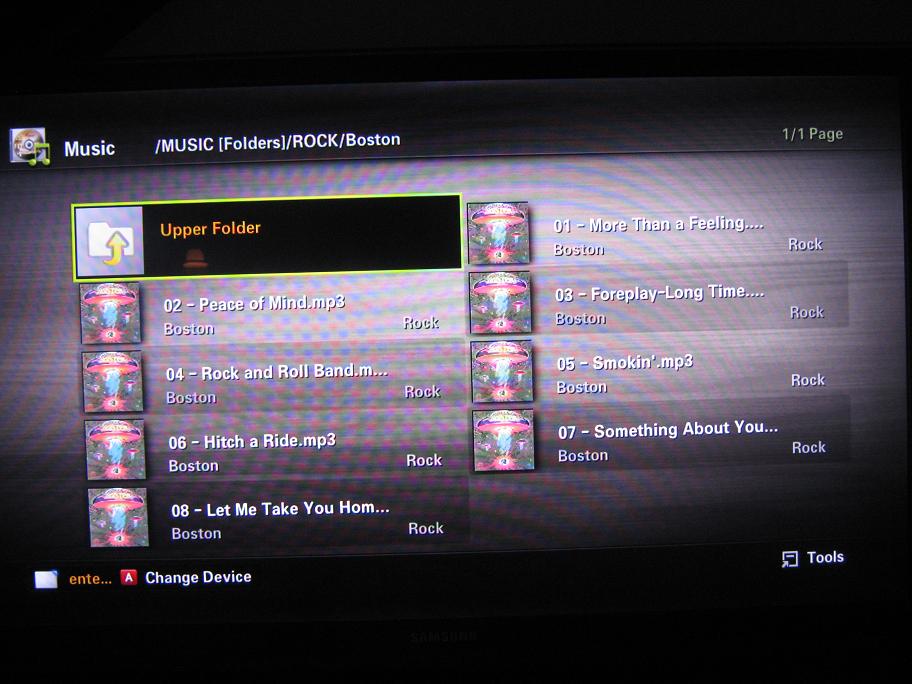
- IMG_0772.JPG (84.82 KiB) Viewed 15634 times
Here is the playing view showing the album art:
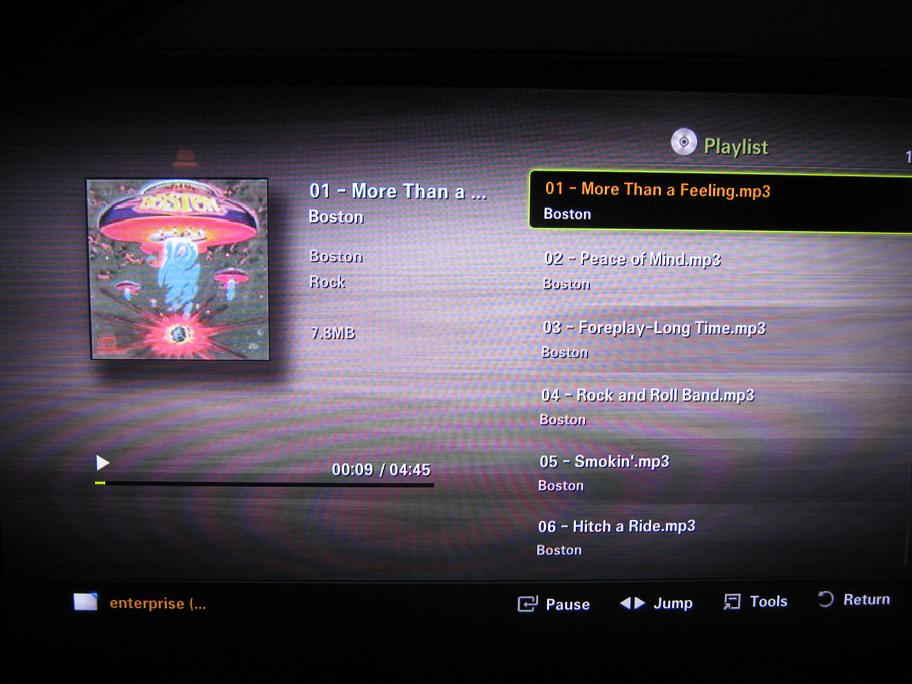
- IMG_0773.JPG (77.1 KiB) Viewed 15634 times
In both cases, the album art is scaled appropriately and unstretched.
Re: Samsung D-series thumbnail stretch
Posted:
Sat Sep 03, 2011 7:07 amby Cerberus
wagstaff wrote:zip wrote:
Can you post a picture of how it looks on yours?
Please forgive the quick and dirty.
Here is the folder view on my C-series showing the album art on each file:
Here is the playing view showing the album art:
In both cases, the album art is scaled appropriately and unstretched.
looks same for me to joe thanks for doing leg work

Re: Samsung D-series thumbnail stretch
Posted:
Sat Sep 03, 2011 10:59 amby zip
but this is music, how does it work for videos? That's where the thumbnails are stretched.
Re: Samsung D-series thumbnail stretch
Posted:
Sat Sep 03, 2011 11:36 amby Cerberus
zip wrote:but this is music, how does it work for videos? That's where the thumbnails are stretched.
appear the same as music with no stretching.
Re: Samsung D-series thumbnail stretch
Posted:
Sat Sep 03, 2011 11:48 amby zip
music is square... a screenshot would be cool
Re: Samsung D-series thumbnail stretch
Posted:
Sat Sep 03, 2011 5:24 pmby wagstaff
I have very little "cover art" for my various videos. As a result, either Serviio or the TV (not sure who is actually doing it) is grabbing a frame out of each video and using that as a thumbnail. The thumbnails for the videos are rectangular and not square like the music thumbnails. But there is no evidence of any stretching as the video frames being grabbed are already in a "widescreen" ratio.
Again, please forgive the quick and dirty snapshot:
Re: Samsung D-series thumbnail stretch
Posted:
Sun Sep 04, 2011 7:12 pmby zip
well yep, these are 19:9 screen grabs, so the TV displays is properly in that rectangle. DVD covers are stretched, as per my screenshot.
Re: Samsung D-series thumbnail stretch
Posted:
Tue Oct 04, 2011 12:56 pmby iSparK
I too have this issue but it's only affected with Online metadata that it grabs, the displayed picture is s-t-r-e-t-c-h-e-d for the folder art... yet everything else is fine?
As mentioned by Zip in this post, can this not be corrected?
iSparK
Re: Samsung D-series thumbnail stretch
Posted:
Sun Oct 09, 2011 5:33 pmby zip
serviio would have to add black borders on the sides of the thumbnails, but it'd have to do so for all renderers, which is crazy. This is a fuck-up of Samsung C/D series DLNA menu.
Re: Samsung D-series thumbnail stretch
Posted:
Tue Oct 11, 2011 10:32 amby iSparK
zip wrote:serviio would have to add black borders on the sides of the thumbnails, but it'd have to do so for all renderers, which is crazy. This is a fuck-up of Samsung C/D series DLNA menu.
Cheers for the response ZIP, not the end if the world...
Re: Samsung D-series thumbnail stretch
Posted:
Fri Dec 16, 2011 6:17 pmby micattack
Hi All!
I own a UE37C5100 and also have the stretched cover problem with movies.

So TV Series with generated Thumbnail works, but Movie covers not.
What is interesting, is that, some of the movies in the above screenshot (e.g. Darkman) get the cover from Online Sources (i.e. Serviio) and others have a folder.jpg.
Check out more Screens and one of the covers here:
@Zip Even though Samsung seems to have messed up here, can't you add a option that calls "imagemagick" to add the black borders?
I experimented with ImageMagick and this command line yields good results:
"c:\Program Files\ImageMagick-6.7.3-Q16\convert.exe" -define jpeg:size=1024x576 folder.jpg -thumbnail "1024x576>" -background black -gravity center -extent 1024x576 folder-new.jpg
This adds black borders to the image and changes the aspect ratio of the image file. I will try this on my Samsung C-Series TV asap.
Cheers
Mic
(Edit: Updated Public Image Links + Image Magick command example)

