Page 1 of 1
Add a profile for Sony S1 Tablet

Posted:
Thu Dec 29, 2011 10:04 pmby lbenoit
Hello there,
I have a KDL XBR10 Sony Bravia TV and Serviio works great to transcode and stream video and audio to it. the majority of my videos are AVI based and won't stream as-is to the TV without transcoding.
I also have a Sony S1 tablet, and the Sony factory installed DNLA client/controller only partially works with Serviio, unfortunately. I can stream in MP3 audio and even "throw" it to the TV through Serviio, but I cannot view or throw any videos on the tablet with any profiles supplied with Serviio.
Is anybody working on a new profile for this device? If so, is there a release date for it? If I can view and throw videos between the tablet and the TV I'll be living the dream!!

Thanks,
LB
Re: Add a profile for Sony S1 Tablet
Posted:
Thu Dec 29, 2011 10:46 pmby moltra
try the directtv profile. it transcodes everything. Will tell us if the S1 tablet can connect to serviio. If it can we can start developing a profile for it.
Also post the information on the device (see signature).
Re: Add a profile for Sony S1 Tablet
Posted:
Fri Dec 30, 2011 12:48 amby zip
in the controller mode (throw) you must assign the TV's profile to the tablet's IP address. In a client mode (to watch on the tablet) you'd have to give it another S1 specific profile.
Re: Add a profile for Sony S1 Tablet
Posted:
Fri Dec 30, 2011 3:48 amby lbenoit
Thanks guys for the quick reply!
I tried the DirecTV profile - didn't work.
To further clarify: the tablet's DLNA player does see and connect to Serviio; it can even see folders, videos, titles and the thumbnails that Serviio provides. It just can't play back the content. Error msg is "The device can't play this content."
Regarding the throwing of videos to the TV, The TV has been automatically added to the Tablet's DLNA controller as a renderer device that can be thrown to. The problem with the DLNA app is, you can't throw media to another device until it has started streaming to the tablet first. A button appears for throwing the content to another device only after the stream has successfully started playing on the tablet. The source content does not have to reside on the tablet to be thrown to the TV (I'm sure you already know that though). I'm assuming the Media Server is supposed to know it now has to transcode the file for another device when it has been given a "throw" command from the tablet's DLNA controller. I'm assuming the Media Server has to have transcoding profiles for both devices to support this kind of throw action. Let me know if I'm understanding it correctly. Also, as I mentioned before, I have been able to successfully throw MP3 audio streamed to the tablet from Serviio to the TV without a hitch.
Finally, Device Spy doesn't show the tablet, unfortunately. I have included the link to the DLNA certification here:
http://certification.dlna.org/certs/REG52620873.pdfLet me know if you want me to try something else... thanks.
LB
Re: Add a profile for Sony S1 Tablet
Posted:
Fri Dec 30, 2011 4:46 amby Cerberus
according to that sepc device ONLY support images and nothing else which would make sense why the directv profile didnt work. as the device is only able to do images and not video or audio over DLNA
Re: Add a profile for Sony S1 Tablet
Posted:
Fri Dec 30, 2011 5:05 amby lbenoit
Yeah I noticed that too, but I can assure you that it works fine with video.
Check out the latest version of the Wild Media Server as it has a profile for this tablet and the Sony supplied DLNA player/controller software and it works great for video streaming & transcoding.
LB
Re: Add a profile for Sony S1 Tablet
Posted:
Fri Dec 30, 2011 6:02 amby Cerberus
lbenoit wrote:Yeah I noticed that too, but I can assure you that it works fine with video.
Check out the latest version of the Wild Media Server as it has a profile for this tablet and the Sony supplied DLNA player/controller software and it works great for video streaming & transcoding.
LB
does it appear on device spy? from intel tools ?
Re: Add a profile for Sony S1 Tablet
Posted:
Fri Dec 30, 2011 7:29 amby lbenoit
No, unfortunately.
Re: Add a profile for Sony S1 Tablet
Posted:
Fri Dec 30, 2011 9:25 amby Cerberus
hmm ok and we found out that it wont play with directv profile so, it wont play mpeg2 files, can you try a selection of the files from the link below and tell us if any of them play using the generic profile.
http://wiki.serviio.org/doku.php?id=test_mediai have a feeling that its only going to play mp4 files, and if thats the case there not much we can do as mp4 isnt a stream friendly format, meaning we cant on the fly transcode into it, so all files would have to be in exactly teh right format teh device likes before adding to library ( manualy transcode each file ).
Re: Add a profile for Sony S1 Tablet
Posted:
Fri Dec 30, 2011 1:00 pmby zip
you can probably look at the WMS profile to figure out what they are transcoding to.
Regarding throwing videos after playback is possible - that's BS on Sony's part. Not really the way a controller should work. You could get Skifta or similar on the tablet and use that instead.
Re: Add a profile for Sony S1 Tablet
Posted:
Fri Dec 30, 2011 1:24 pmby Cerberus
zip wrote:you can probably look at the WMS profile to figure out what they are transcoding to.
Regarding throwing videos after playback is possible - that's BS on Sony's part. Not really the way a controller should work. You could get Skifta or similar on the tablet and use that instead.
i agree if its android dont mess about get rockplayer lite and skifta and use generic profile and everything will play.
http://wiki.serviio.org/doku.php?id=androidtools
Re: Add a profile for Sony S1 Tablet
Posted:
Fri Dec 30, 2011 5:49 pmby lbenoit
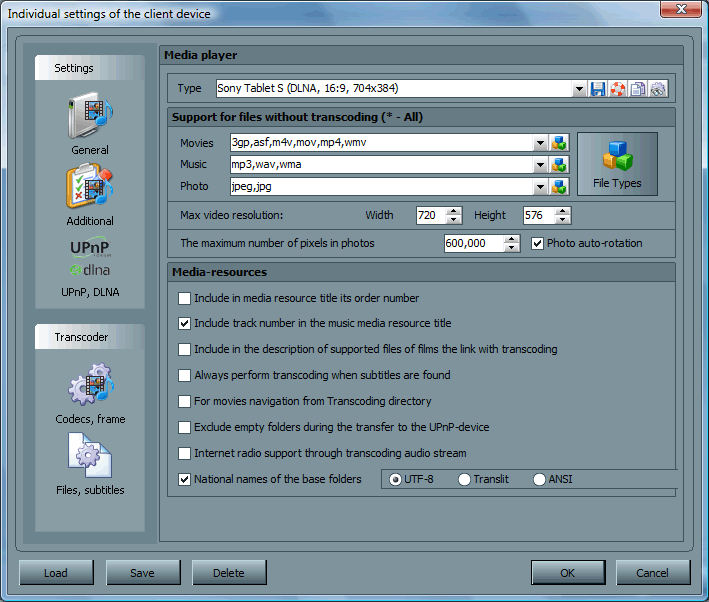
- Device profile screen
- WMS-deviceprofile-screenshot.gif (45.89 KiB) Viewed 18082 times
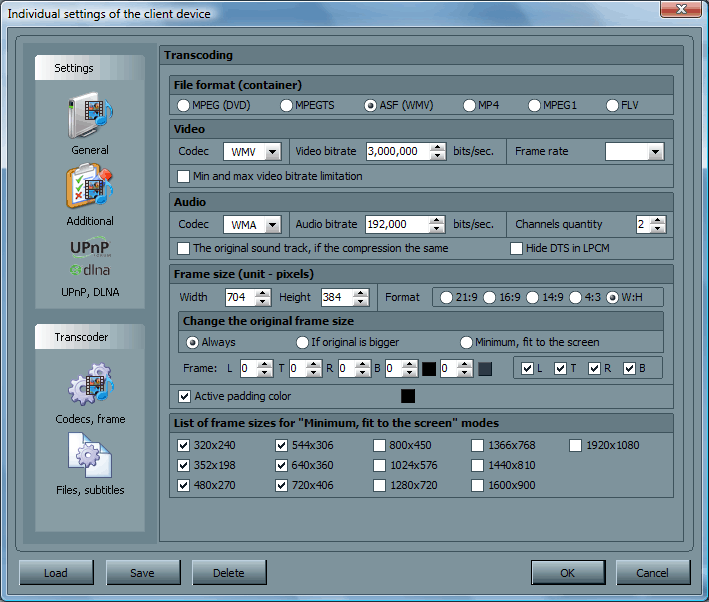
- Transcoder settings
- WMS-transcoder-screenshot.gif (46.78 KiB) Viewed 18082 times
Here's some screen shots from WMS regarding the device and transcoding profiles for the S1 tablet.
Also, here's the supported video formats straight from Sony's KB:
http://www.kb.sony.com/selfservice/micr ... 7&fes=trueI'll also install skifta and rockplayer lite and will get back to you. Yes it is an Android tablet.
Thanks again!
LB
Re: Add a profile for Sony S1 Tablet
Posted:
Fri Dec 30, 2011 6:01 pmby Cerberus
yer as I suspected only supported formats is WMV and MP4, so not great for transcoding, so your best bet is install skifta and rockplayer and use that.

Re: Add a profile for Sony S1 Tablet
Posted:
Fri Dec 30, 2011 7:45 pmby zip
you can transcode to WMV (asf), look at the Xbox profile
Re: Add a profile for Sony S1 Tablet
Posted:
Wed Jan 04, 2012 1:52 amby lbenoit
Hey again... thanks for the skifta/rockplayer suggestion. They both work pretty nicely with Serviio!!
One last issue at this time... I can use the aforementioned Sony Bravia TV to navigate and watch movies from Serviio (99% of them have to be transcoded due to incompatible container/codec types, but most of them work fine), however, if I try to throw a video to the TV using Skifta or Bubble UPnP on the tablet it never works. Any suggestions there?
Thanks.
Re: Add a profile for Sony S1 Tablet
Posted:
Wed Jan 04, 2012 8:11 amby Cerberus
thats because android and the TV use different profiles, you would have to assign skifta android device the sony bravia profile for your tv in the console for this to work.
Re: Add a profile for Sony S1 Tablet
Posted:
Wed Jan 04, 2012 4:34 pmby lbenoit
Unfortunately your suggestion didn't work.
It seems to be if I throw a video that requires transcoding it won't work (although I can view it ok by navigating and playing it directly from the TV), but if I throw one that is natively supported by the TV it will work.
DLNA limitation?
Re: Add a profile for Sony S1 Tablet
Posted:
Wed Jan 04, 2012 5:56 pmby Cerberus
yer that cause u have to assign the profile for the TV to the tablet and then use push so that serviio then transcodes as the TV requires.
Re: Add a profile for Sony S1 Tablet
Posted:
Wed Jan 04, 2012 6:21 pmby lbenoit
Hi... that's what I did do.
I assigned "Sony Bravia TV" to the tablet. I can see when playing an example video in Rockplayer (passed in through Skifta as a local renderer) that it has been transcoded to mpeg2 (vob), where originally under the generic profile it would come in as avi and some other encoding. In either case, trying to push the video with Skifta using any profile doesn't work unless the video is natively supported by the TV.
Do I have to manually transcode my entire movie library to mpeg2 to get this to work? I hope not!
Thanks,
LB
Re: Add a profile for Sony S1 Tablet
Posted:
Wed Jan 04, 2012 8:09 pmby Cerberus
lbenoit wrote:Hi... that's what I did do.
I assigned "Sony Bravia TV" to the tablet. I can see when playing an example video in Rockplayer (passed in through Skifta as a local renderer) that it has been transcoded to mpeg2 (vob), where originally under the generic profile it would come in as avi and some other encoding. In either case, trying to push the video with Skifta using any profile doesn't work unless the video is natively supported by the TV.
Do I have to manually transcode my entire movie library to mpeg2 to get this to work? I hope not!
Thanks,
LB
kk that would be a skifta issue rather than us then as if it shows as mpeg2 its being transcoded correctly by serviio.