Page 1 of 1
Embedded subtitle support in MP4 files

Posted:
Wed Jul 17, 2013 1:06 pmby Sam___D
Hi
I'm using Serviio on Windows Server 2008 R2 to stream files to a Philips TV, a PlayStation 3 and a bunch of Android devices with BubbleUPNP and MX Player.
All my video files are .mp4 files with a H264 video stream (720p or 1080p), an AAC audio stream and embedded subtitles. The files are encoded with the latest stable version of Handbrake and they work fine if I play them directly with VLC for Windows or MX Player for Android. There is always a button to enable subtitles if they aren't enabled (depends on the language) automatically.
But when I use Serviio I never see subtitles. Not on my Philips TV, neither on my PS3 and neither on my Android devices. All these devices have buttons to enable subtitles but they're always greyed out. What should I change in Serviio's settings to enable subtitles? The subtitles are in English or in Dutch ("Nederlands").
Re: Embedded subtitle support in MP4 files
Posted:
Wed Jul 17, 2013 6:21 pmby zip
Depends on the renderer. None of these probably support embedded subtitles.
Enable embedded subtitles in the console. It will then serve the subtitles as external source. The MX player might support that. the other two will need you to enable Burned-in subtitles, which will cause all your file to be transcoded.
Re: Embedded subtitle support in MP4 files
Posted:
Tue Jul 23, 2013 3:04 pmby Sam___D
Okay, so I included a screenshot of my current settings in this post. Now they work on Android (with BubbleUPNP and MX Player). My PlayStation 3 still doesn't give me the option to enable them.
I couldn't test with my Philips TV due to another problem. I bought a WD My Net N900 router and added it to my network as an access point. Now my Philips TV can only see the N900's built-in media server and not Serviio.
Re: Embedded subtitle support in MP4 files
Posted:
Tue Jul 23, 2013 10:52 pmby zip
You need to enable the third option (burned in subtitles) for the PS3 and philips devices to see any subs.
Re: Embedded subtitle support in MP4 files
Posted:
Wed Jul 24, 2013 3:23 pmby Sam___D
I still don't see subtitles on my PS3 with these settings.
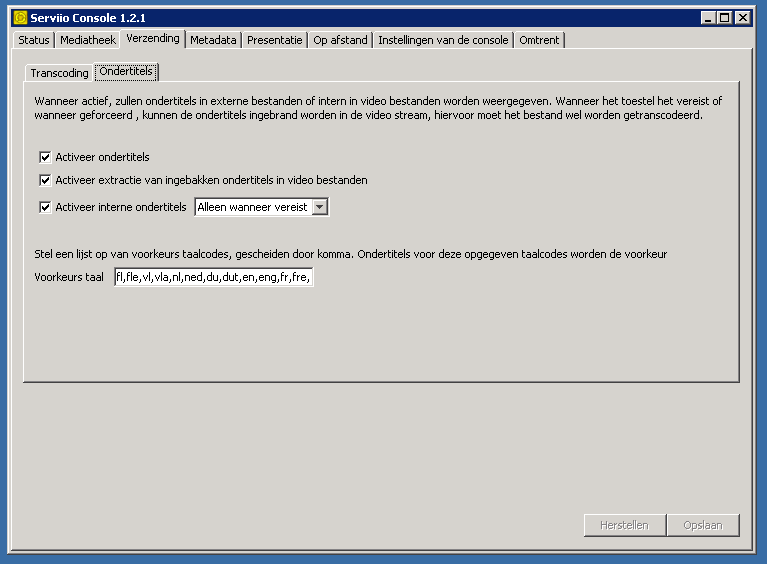
- Naamloos.png (14.16 KiB) Viewed 8703 times
I've tested this with a video file with a size of 2,35 GB and a duration of 02:16:17.

- Naamloos2.png (32.12 KiB) Viewed 8703 times
The server has 4 GB RAM, Intel Core 2 Quad Q9300 and Windows Server 2008 R2.
Re: Embedded subtitle support in MP4 files
Posted:
Sat Jul 27, 2013 12:06 pmby zip
post ffmpeg -i for the file
Re: Embedded subtitle support in MP4 files
Posted:
Sat Jul 27, 2013 1:23 pmby Sam___D
- Code:
C:\Program Files\Serviio\lib>ffmpeg.exe -i "I:\media\films\Amazing Spiderman (20
12)\The.amazing.spiderman.2012.1080p.brrip.x264.yify_c_1.mp4"
ffmpeg version 1.1.1 Copyright (c) 2000-2013 the FFmpeg developers
  built on Feb  5 2013 21:59:54 with gcc 4.7.2 (GCC)
  configuration: --enable-static --disable-shared --disable-ffplay --disable-ffs
erver --enable-memalign-hack --enable-libmp3lame --enable-libass --enable-librtm
p --enable-fontconfig --enable-libfreetype --enable-zlib --extra-libs='-lrtmp -l
polarssl -lws2_32 -lwinmm -lexpat -lfreetype -lfribidi -lz' --arch=x86 --enable-
runtime-cpudetect --enable-pthreads --target-os=mingw32 --cross-prefix=i686-w64-
mingw32- --pkg-config=pkg-config
  libavutil      52. 13.100 / 52. 13.100
  libavcodec     54. 86.100 / 54. 86.100
  libavformat    54. 59.106 / 54. 59.106
  libavdevice    54.  3.102 / 54.  3.102
  libavfilter     3. 32.100 /  3. 32.100
  libswscale      2.  1.103 /  2.  1.103
  libswresample   0. 17.102 /  0. 17.102
Input #0, mov,mp4,m4a,3gp,3g2,mj2, from 'I:\media\films\Amazing Spiderman (2012)
\The.amazing.spiderman.2012.1080p.brrip.x264.yify_c_1.mp4':
  Metadata:
    major_brand     : mp42
    minor_version   : 0
    compatible_brands: mp42isomavc1
    creation_time   : 2013-05-26 13:32:45
    encoder         : HandBrake 0.9.8 2012071700
  Duration: 02:16:17.42, start: 0.000000, bitrate: 2472 kb/s
    Stream #0:0(und): Video: h264 (Main) (avc1 / 0x31637661), yuv420p, 1916x802
[SAR 1:1 DAR 958:401], 2307 kb/s, 23.98 fps, 23.98 tbr, 90k tbn, 180k tbc
    Metadata:
      creation_time   : 2013-05-26 13:32:45
    Stream #0:1(eng): Audio: aac (mp4a / 0x6134706D), 48000 Hz, stereo, fltp, 15
9 kb/s
    Metadata:
      creation_time   : 2013-05-26 13:32:45
    Stream #0:2(eng): Subtitle: mov_text (tx3g / 0x67337874)
    Metadata:
      creation_time   : 2013-05-26 13:32:45
At least one output file must be specified
Re: Embedded subtitle support in MP4 files
Posted:
Sun Jul 28, 2013 10:53 amby zip
mov_text subtitles are not supported. I will have a look at how difficult it'd be to ad them.
Re: Embedded subtitle support in MP4 files
Posted:
Sun Jul 28, 2013 12:14 pmby Sam___D
It seems to be the default setting in Handbrake. Do you happen to know how to change that in Handbrake to a supported format?
Re: Embedded subtitle support in MP4 files
Posted:
Mon Jul 29, 2013 12:10 pmby zip
No, it'd be something like srt.
I've implemented mov_text for 1.3 yesterday though, so you should get it in a couple of weeks
Re: Embedded subtitle support in MP4 files
Posted:
Mon Jul 29, 2013 1:09 pmby Sam___D
Thanks, when it works on all my devices I'll buy the pro version
