Page 1 of 1

[SOLVED] Hebrew Subtitles problem with PS3

PostPosted: Thu Aug 08, 2013 10:36 am
by i123b456
I have downloaded Hebrew subtitles and put in correctly in my movies folders. but when i play it , its not appears like the right language , it appears just in very strange "symbols " .
please help me what to do

Re: SUBTITLTES PROBLEM ! PS3

PostPosted: Thu Aug 08, 2013 11:28 am
by Illico
Read http://www.serviio.org/index.php?option ... icle&id=33

Check that Subtitle character encoding field is the same than your subtitle file (with notepad++ editor)

Re: SUBTITLTES PROBLEM ! PS3

PostPosted: Thu Aug 08, 2013 6:48 pm
by i123b456
Illico wrote:Read http://www.serviio.org/index.php?option ... icle&id=33

Check that Subtitle character encoding field is the same than your subtitle file (with notepad++ editor)


do you mean : the place where it says preferred language ? is that so ?

Re: SUBTITLTES PROBLEM ! PS3

PostPosted: Fri Aug 09, 2013 11:42 am
by i123b456
is that so ?

Re: SUBTITLTES PROBLEM ! PS3

PostPosted: Fri Aug 09, 2013 12:03 pm
by Illico
When you open your subtitle file with Notepad++ tool (advanced text editor), does "Hebrew " with special character are well displayed (by default file should be encoded in UTF-8 )?

Whats happen when you change the character set in notepad++ (something like Windows-1255) ?

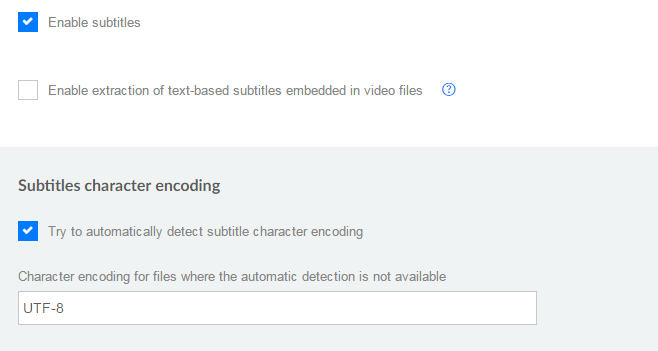
If you want to see special character, you probably have to change to Windows-1255 on notepad++ then save your file, and change the UTF-8 value to cp1255 on serviio console.
--> make a backup of your original subtitle file <--

Image

Re: SUBTITLTES PROBLEM ! PS3

PostPosted: Fri Aug 09, 2013 12:49 pm
by i123b456
ok , and how do i change the notepad ++ file to windows -1255 ? what is that mean?

Re: SUBTITLTES PROBLEM ! PS3

PostPosted: Fri Aug 09, 2013 1:20 pm
by Illico
i123b456 wrote:ok , and how do i change the notepadd ++ file to windows -1255 ? what is that mean?


- Open your file with notepad++ (make a backup before)
- Select Encoding menu : post here the value of the original file, should be encode in UTF-8
- Select Encoding menu -> Character set --> Hebrew --> Windows-1255
- Then save your file, the character encoding should be modified.

EDIT : For your information about character encoding : http://en.wikipedia.org/wiki/Character_encoding
For Hebrew : http://en.wikipedia.org/wiki/Windows-1255

Re: SUBTITLTES PROBLEM ! PS3

PostPosted: Fri Aug 09, 2013 1:27 pm
by Illico
I see you use PS3 device, but I don't remember if serviio delivered the subtitle srt file in native format or if it burned srt in video stream...

Re: SUBTITLTES PROBLEM ! PS3

PostPosted: Fri Aug 09, 2013 2:49 pm
by i123b456
Illico wrote:
i123b456 wrote:ok , and how do i change the notepadd ++ file to windows -1255 ? what is that mean?


- Open your file with notepad++ (make a backup before)
- Select Encoding menu : post here the value of the original file, should be encode in UTF-8
- Select Encoding menu -> Character set --> Hebrew --> Windows-1255
- Then save your file, the character encoding should be modified.

EDIT : For your information about character encoding : http://en.wikipedia.org/wiki/Character_encoding
For Hebrew : http://en.wikipedia.org/wiki/Windows-1255

its says the file is ANSI encoding

Re: SUBTITLTES PROBLEM ! PS3

PostPosted: Fri Aug 09, 2013 2:54 pm
by i123b456
ITS WORKING !!!!!!!!!!!!! I LOVE YOU MY MAN ! ITS WORKING!! So now i need to do this to all my files? edit it with notepad ++?

Re: SUBTITLTES PROBLEM ! PS3

PostPosted: Fri Aug 09, 2013 3:57 pm
by Illico
i123b456 wrote:ITS WORKING !!!!!!!!!!!!! I LOVE YOU MY MAN ! ITS WORKING!! So now i need to do this to all my files? edit it with notepad ++?


Just to be sure...
Could you retry with another file but before, disable all box on serviio console subtitle tab and retry ?

Re: SUBTITLTES PROBLEM ! PS3

PostPosted: Fri Aug 09, 2013 4:53 pm
by i123b456
Illico wrote:
i123b456 wrote:ITS WORKING !!!!!!!!!!!!! I LOVE YOU MY MAN ! ITS WORKING!! So now i need to do this to all my files? edit it with notepad ++?


Just to be sure...
Could you retry with another file but before, disable all box on serviio console subtitle tab and retry ?

disable all box ?

Re: SUBTITLTES PROBLEM ! PS3

PostPosted: Fri Aug 09, 2013 5:34 pm
by Illico
i123b456 wrote:disable all box ?

Yes, on serviio console could you uncheck all box and press save button.
Image

I suspect that for PS3 the srt file was delivered in native format but with a wrong character set, (should be cp1255 for Hebrew, not UTF-8), so nothing about serviio setting.
So to confirm, I would like to try with all subtitles disabled on serviio console. And retry with another movie file (with another srt file).

Re: SUBTITLTES PROBLEM ! PS3

PostPosted: Fri Aug 09, 2013 9:56 pm
by zip
For PS3 you need burned in subs.

Re: SUBTITLTES PROBLEM ! PS3

PostPosted: Sat Aug 10, 2013 7:54 am
by Illico
zip wrote:For PS3 you need burned in subs.


So the user should edit the subtitle file and change to Windows-1255 character encoding and change value in serviio console with cp1255.

Re: [SOLVED] Hebrew Subtitles problem with PS3

PostPosted: Sat Aug 10, 2013 5:39 pm
by zip
Yes, they will need to have all their files in the same encoding, either utf-8 or cpxxxx, and use that value in the console.

Note the encoding option is only for hardsubs, external subtitles are delivered as they are.