FAQ  •  Register  •  Login

Cannot Connect To The Server - Windows 8.1

<<

anthonyh

Serviio newbie

Posts: 6

Joined: Wed Aug 17, 2016 12:04 am

Location: Australia

Post Wed Aug 17, 2016 12:37 am

Cannot Connect To The Server - Windows 8.1

Hi

I've been searching the net and tried many things since yesterday morning without any success. I have tried searching this forum many times without a solution working... Please excuse if the actual solution is somewhere deep in this forum.

I have the pro version of Serviio and have been successfully using it for about two years.

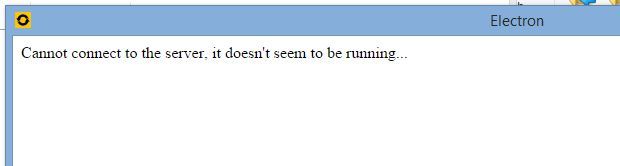
When I try to open the program (console) now I get the message 'Cannot connect to the server, it doesn't seem to be running...'

When I check the service it says that Serviio has stopped. When trying to start the service it starts momentarily and then stops again. I then get the following message: 'Windows could not start the Serviio service on Local Computer. Error 1067: The process terminated unexpectedly'

Background info:

1. I recently upgraded to Windows 8.1 from Windows 8.
2. I bought some software that needed a Java update.

What have I tried so far:

1. Numerous uninstalls and installs of the latest version Java 64bit. I have also tried numerous times to install the 32 bit version as well, but have been unsuccessful. This happened with the infamous Error 1603 problem. Have tried all the fixes I could find on the problem as suggested in various places over the internet. Not sure if this is the problem anyway. However, Java 64bit is working with the new program I installed.
2. Have reinstalled Serviio numerous times. The only old version I have that worked is 1.4.1.2. Later versions from 1.5.1 upwards all have this problem.
3. Somewhere on this forum I saw numerous requests from people assisting that they needed a log file. As I can't even start the console there doesn't appear to be the ability to create logs.
4. Set the ports in Windows Firewall. Didn't appear to do anything.
4. I probably tried several more things yesterday,

I really hope the solution is simple! I also appreciate any help that is given.

Cheers

Anthony
<<

DenyAll

DLNA master

Posts: 2257

Joined: Fri Mar 08, 2013 11:16 pm

Location: Adelaide, Australia

Post Wed Aug 17, 2016 9:12 am

Re: Cannot Connect To The Server - Windows 8.1

What version of Serviio are you on (or trying now)?

From version 1.5 onward Serviio for WIndows bundles Java with it, so Java should not [normally] be the issue.

What we really need to see is the log. Serviio creates this irrespective of your console - so, go to your C:\Program Files\Serviio\log folder and delete any files starting with serviio.log. Then try and start Serviio.
Go back to the log folder and there should be a new log file. Open it with a text editor and see if that gives you a hint as to the problem (or post it here and we can look at it).
DenyAll
Panasonic Viera FX800A | Panasonic Viera CS610A | Sony PS4 | Sony PS3 | Panasonic DMP-BD79 | Yamaha RX-V500D | iPad | Windows 10 | Serviio 1.10.1 Pro
WinHelper | MediaInfo

Beta Tester, Moderator
Please do not PM me for support as any solution cannot be shared with others.
<<

anthonyh

Serviio newbie

Posts: 6

Joined: Wed Aug 17, 2016 12:04 am

Location: Australia

Post Wed Aug 17, 2016 1:35 pm

Re: Cannot Connect To The Server - Windows 8.1

Thanks for your reply. I'm glad that Java is not the issue.

I didn't install Serviio on my C drive. It's in F:\Programs\Serviio.

I uninstalled the program and tried installing again in the default directory in C. Tried starting, and the same thing. The Process terminated unexpectedly. Error 1067.

There is nothing in the log folder.

I am trying to get serviio-1.6.1 for windows working.

Just in case I modified the log4j.xml file to enable debug level logging. (REF: http://wiki.serviio.org/doku.php?id=detail_logging). Tried starting the Serviio service again. No log file. Tried starting the Serviio Console. No log file.

I hope this gives you (or somebody else more clues as I am stumped!
<<

DenyAll

DLNA master

Posts: 2257

Joined: Fri Mar 08, 2013 11:16 pm

Location: Adelaide, Australia

Post Thu Aug 18, 2016 5:06 am

Re: Cannot Connect To The Server - Windows 8.1

Installation drive (C: or F:) shouldn't matter.
I'm not sure whats going on here. You may need to look at the Windows Event viewer and see what errors that's producing.

Try running \Serviio\bin\serviio.bat and see if that starts the server.

<Edit>I'm wondering if the other java app is what is hurting you. Try:

  • Navigate to Control Panel | System and Security | System | Advanced System settings | Advanced Tab | Environment Variables or right-click Computer icon, click Advanced System settings | Advanced Tab Environment Variables
    Remove the System variable _JAVA_OPTIONS environment variable if it exists (noting it down in case it now plays havoc with the other app. Also if it is hurting post it here and zip may be able to advise);
    and/or
  • Uninstall the other app. get Serviio up and running and then try the re-install.
DenyAll
Panasonic Viera FX800A | Panasonic Viera CS610A | Sony PS4 | Sony PS3 | Panasonic DMP-BD79 | Yamaha RX-V500D | iPad | Windows 10 | Serviio 1.10.1 Pro
WinHelper | MediaInfo

Beta Tester, Moderator
Please do not PM me for support as any solution cannot be shared with others.
<<

anthonyh

Serviio newbie

Posts: 6

Joined: Wed Aug 17, 2016 12:04 am

Location: Australia

Post Thu Aug 18, 2016 8:30 am

Re: Cannot Connect To The Server - Windows 8.1

Hi

\Serviio\bin\serviio.bat

I have tried this many times now. It did not do anything different ie. the serviio service starts for less than a second and stops.

In the suggested 'Advanced Tab Environment Variables' I had the following:

_JAVA_OPTIONS
-Xmx3000m

I removed it and then tried starting the service. Same problem.

I closed the programs that are using Java. I was looking for the uninstall link for them. Couldn't find a link. Decided to click the jzpiinstall.exe that was in the folder that I installed from. It looks as if has installed the 32 bit version of Java - Something I couldn't successfully do via java.com (using both online and offline installs).

Anyway, I then removed Serviio one more time. Saw that it had left a log file after removal. Was happy I could report this. Deleted the contents of the directory. Installed again and Serviio started! I am using the browser to listen to a media file. However, Serviio service is still saying that it is stopped. Just tried connected to my Media Library via my TV in the lounge room and was successful. Not sure what that means if the Service is apparently stopped!

Can I try adding the _JAVA_OPTIONS again? I think I need this for the other program.

Will report any further problems to this thread.

Sorry if the above sounds messy and unintelligible. It's partly to do with my current terrible sore throat and frustration with this problem.

Thanks for your help.
<<

DenyAll

DLNA master

Posts: 2257

Joined: Fri Mar 08, 2013 11:16 pm

Location: Adelaide, Australia

Post Thu Aug 18, 2016 1:32 pm

Re: Cannot Connect To The Server - Windows 8.1

Good to see its working.

..and Serviio started! I am using the browser to listen to a media file. However, Serviio service is still saying that it is stopped
Weird. Did you start Serviio using the batch file? Did you try starting the service manually (from Services.msc)?

Yes try adding that variable back in. AFAIK it controls the maximum memory heap allocated to Java aps, and is larger than what Serviio requires (512M normally).
DenyAll
Panasonic Viera FX800A | Panasonic Viera CS610A | Sony PS4 | Sony PS3 | Panasonic DMP-BD79 | Yamaha RX-V500D | iPad | Windows 10 | Serviio 1.10.1 Pro
WinHelper | MediaInfo

Beta Tester, Moderator
Please do not PM me for support as any solution cannot be shared with others.
<<

anthonyh

Serviio newbie

Posts: 6

Joined: Wed Aug 17, 2016 12:04 am

Location: Australia

Post Thu Aug 18, 2016 10:33 pm

Re: Cannot Connect To The Server - Windows 8.1

Hi

From memory it started straight after reinstalling again.

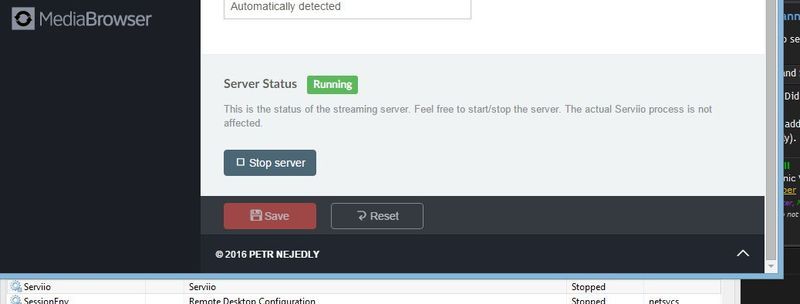
I have attached a screenshot to show the service is stopped, but MediaBrowser is reporting the Server Status as 'Running'. Can you please explain that?

Image

Serviio has been up and running since last night. Later this morning I will try rebooting the PC and see if I have any problems with it then. I will then try introducing the Java variables then - perhaps this time with a smaller size. I will post if I have any problems.

Thanks once again for your help on this problem.
<<

atc98092

User avatar

DLNA master

Posts: 5520

Joined: Fri Aug 17, 2012 10:22 pm

Location: Washington (the state)

Post Fri Aug 19, 2016 12:26 am

Re: Cannot Connect To The Server - Windows 8.1

There is a difference between the DLNA server and the Serviio service running. The screenshot you show is the DLNA server. The Serviio service is independent of this function, and the console does not indicate the status of the service. Sounds like you might be confusing the two.

If the service is stopped, then Serviio just doesn't exist on your network. If the service is running but the DLNA server is stopped, I believe that MediaBrowser will still work, but your DLNA players on the network will not see Serviio as available.
Dan

LG NANO85 4K TV, Samsung JU7100 4K TV, Sony BDP-S3500, Sharp 4K Roku TV, Insignia Roku TV, Roku Ultra, Premiere and Stick, Nvidia Shield, Yamaha RX-V583 AVR.
Primary server: AMD Ryzen 5 5600GT, 32 gig ram, Windows 11 Pro, 22 TB hard drive space | Test server: Intel i5-6400, 16 gig ram, Windows 10 Pro

HOWTO: Enable debug logging HOWTO: Identify media file contents
<<

DenyAll

DLNA master

Posts: 2257

Joined: Fri Mar 08, 2013 11:16 pm

Location: Adelaide, Australia

Post Fri Aug 19, 2016 12:33 am

Re: Cannot Connect To The Server - Windows 8.1

If the service is stopped, Serviio console wont work - so it must be running.

No I cant explain it - how are you seeing that the service is stopped (are you using services.msc - I can't tell from the screenshot)?
I believe it is possible to run Serviio as an application rather than a service - what user does task manager show serviioservice.exe running as (click on Show processes from all users)?
DenyAll
Panasonic Viera FX800A | Panasonic Viera CS610A | Sony PS4 | Sony PS3 | Panasonic DMP-BD79 | Yamaha RX-V500D | iPad | Windows 10 | Serviio 1.10.1 Pro
WinHelper | MediaInfo

Beta Tester, Moderator
Please do not PM me for support as any solution cannot be shared with others.
<<

anthonyh

Serviio newbie

Posts: 6

Joined: Wed Aug 17, 2016 12:04 am

Location: Australia

Post Fri Aug 19, 2016 11:47 am

Re: Cannot Connect To The Server - Windows 8.1

Thanks for your replies. Very confused now! Will try and answer your questions and then let you know how I went when I rebooted the PC.

The screenshot you show is the DLNA server. The Serviio service is independent of this function, and the console does not indicate the status of the service. Sounds like you might be confusing the two.


Yes, I am confusing them! Still not sure what each does though.

If the service is stopped, Serviio console wont work - so it must be running.


OK.

how are you seeing that the service is stopped (are you using services.msc - I can't tell from the screenshot)?


The Services Tab within Task Manager.

Now I had an interesting experience when I rebooted the PC for the first time after getting Serviio to work. After rebooting I could not start Serviio again and had the following message each time I tried to start it.

Image

I then tried starting using the serviio.bat file and recieved the following message:

Image

Very confused now, as you can probably imagine. Checked the file was indeed missing and here's a screenshot of the folder in alphabetical order. There is indeed no javaw.exe in the directory.

Image

Deleted the Serviio folder and reinstalled the Serviio program. This time the javaw.exe file was in the bin directory. Started the program and all was working! The Serviio service is Running within the Services Tab of Task Manager. Still don't understand what exactly that service is according atc98092, however it's running and the program is working. I put in my pro license file and then established the library. Once that had finished I then shut the program down, rebooted the PC again and it started perfectly when I opened the Console.

Thanks to the both of you for assisting me with the problem. Hopefully all is working now.
<<

atc98092

User avatar

DLNA master

Posts: 5520

Joined: Fri Aug 17, 2012 10:22 pm

Location: Washington (the state)

Post Fri Aug 19, 2016 2:17 pm

Re: Cannot Connect To The Server - Windows 8.1

The Serviio service (see in the Services applet) is the entire Serviio background process. This includes the web page for the console as well as the MediaBrowser web page. If that service isn't running, Serviio is completely turned off, so to speak.

The DLNA server (status can be found and controlled in the console) is only responsible for providing DLNA network access to Serviio. This can be turned off in the console, but Serviio itself is still running. Library updates continue, and changes to the configuration files are not effective by stopping and starting the DLNA server. The Serviio service must be stopped and restarted for configuration changes to be effective.

The most important thing is that it is now working for you. It appears that some sort of Java issue occurred on the previous installation, and you have it all sorted out now. Enjoy your Serviio now! :D
Dan

LG NANO85 4K TV, Samsung JU7100 4K TV, Sony BDP-S3500, Sharp 4K Roku TV, Insignia Roku TV, Roku Ultra, Premiere and Stick, Nvidia Shield, Yamaha RX-V583 AVR.
Primary server: AMD Ryzen 5 5600GT, 32 gig ram, Windows 11 Pro, 22 TB hard drive space | Test server: Intel i5-6400, 16 gig ram, Windows 10 Pro

HOWTO: Enable debug logging HOWTO: Identify media file contents
<<

anthonyh

Serviio newbie

Posts: 6

Joined: Wed Aug 17, 2016 12:04 am

Location: Australia

Post Fri Aug 19, 2016 11:04 pm

Re: Cannot Connect To The Server - Windows 8.1

The most important thing is that it is now working for you. It appears that some sort of Java issue occurred on the previous installation, and you have it all sorted out now. Enjoy your Serviio now! :D


Thanks for your help.

Return to Serviio Support & Help

Who is online

Users browsing this forum: Bing [Bot] and 13 guests

Powered by phpBB © 2000, 2002, 2005, 2007 phpBB Group.
Designed by ST Software for PTF.