FAQ  •  Register  •  Login

How do I add folders from a network drive to my Serviio Libr

<<

tgordon

Serviio newbie

Posts: 11

Joined: Wed May 27, 2026 8:01 pm

Post Fri Jun 19, 2026 6:18 pm

How do I add folders from a network drive to my Serviio Libr

How do I add folders from a network drive to my Serviio Library? I have created a network folder to my pc and assigned a drive letter of Z:, but when I attempt to add folders from that drive I am only allowed to choose folders from my C; drive.
<<

atc98092

User avatar

DLNA master

Posts: 5511

Joined: Fri Aug 17, 2012 10:22 pm

Location: Washington (the state)

Post Fri Jun 19, 2026 10:54 pm

Re: How do I add folders from a network drive to my Serviio

Serviio on a Windows PC runs under a system service user account. The network drive you mapped to Z is not visible to that user account. The only way to make it appear is to change the user account that the Serviio service uses to match the user account that created the drive mapping. You cannot use a UNC network path as a media source from my experience. You can change the user account under the Windows System applet. Just make sure you have the user account name and password correct, as it does not validate them when you enter it. If you get it wrong the service will not start.
Dan

LG NANO85 4K TV, Samsung JU7100 4K TV, Sony BDP-S3500, Sharp 4K Roku TV, Insignia Roku TV, Roku Ultra, Premiere and Stick, Nvidia Shield, Yamaha RX-V583 AVR.
Primary server: AMD Ryzen 5 5600GT, 32 gig ram, Windows 11 Pro, 22 TB hard drive space | Test server: Intel i5-6400, 16 gig ram, Windows 10 Pro

HOWTO: Enable debug logging HOWTO: Identify media file contents

<<

tgordon

Serviio newbie

Posts: 11

Joined: Wed May 27, 2026 8:01 pm

Post Fri Jun 19, 2026 11:46 pm

Re: How do I add folders from a network drive to my Serviio

Dan:
You completely lost me. Are you talking about changing the user account that created the network drive on my desktop PC? If so, that would be the Windows administrator account for the desktop PC. I wanted to make sure you weren't referring to the Windows administrator account for the PC where the drive is physically attached (it''s a USB drive).
If all that's correct, where do I change the user account that Serviio runs under. Do I do that in the Services app in Windows Control panel? I checked in the Logon tab for the Serviio Service and right now it's blank.
Again, I'm guessing but I would think that Serviio would be then be running under the user account for the desktop PC, since Serviio was installed by me on that same PC. If I'm guessing correctly, then I wouldn't actually be changing anything.

Last but not least, let's say that for some reason I wanted to return to Serviio running under the system service user account (whatever that is. I read that there are several of these). How would I reverse the action you are recommending. I always like to have a way to undo changes.
<<

atc98092

User avatar

DLNA master

Posts: 5511

Joined: Fri Aug 17, 2012 10:22 pm

Location: Washington (the state)

Post Sat Jun 20, 2026 12:41 am

Re: How do I add folders from a network drive to my Serviio

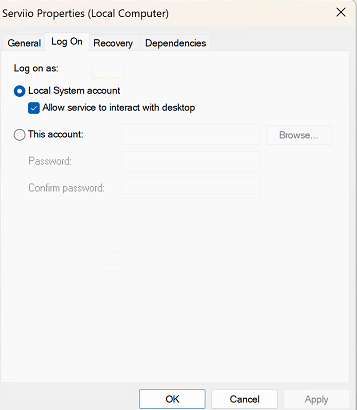
Every Windows services runs under some sort of account. There are user accounts and system accounts with varying permission levels. By default Serviio uses a local system account that has little to no networking permissions. When you created the mapped Z drive letter, that was done under your user account, and that mapping only exists for that one user account. Any networked location is not accessible by the system account. And I am talking about the account on the Serviio PC, not the networked PC.

The attached image shows my Serviio service login page. Yours is likely identical. Notice the Local System account is selected, which is the account I am referring to that Serviio uses by default. If you click this account, yes it is blank because you haven't selected a user account to use. If you click Browse, the the Advanced button, a list of every account on your computer is shown and you can choose which one you would prefer to use. As I said, to use the Z: drive that you mapped, you have to use your User account to run Serviio.

Now, you just mentioned a USB drive. If it's connected directly to the Serviio PC, then it is a local drive and Serviio should see it with the system account. But if it's on the networked computer, then it has to be accessed as I describe above.
Attachments
Screenshot 2026-06-19 165600.png
Screenshot 2026-06-19 165600.png (36.23 KiB) Viewed 929 times
Dan

LG NANO85 4K TV, Samsung JU7100 4K TV, Sony BDP-S3500, Sharp 4K Roku TV, Insignia Roku TV, Roku Ultra, Premiere and Stick, Nvidia Shield, Yamaha RX-V583 AVR.
Primary server: AMD Ryzen 5 5600GT, 32 gig ram, Windows 11 Pro, 22 TB hard drive space | Test server: Intel i5-6400, 16 gig ram, Windows 10 Pro

HOWTO: Enable debug logging HOWTO: Identify media file contents
<<

tgordon

Serviio newbie

Posts: 11

Joined: Wed May 27, 2026 8:01 pm

Post Sat Jun 20, 2026 2:07 am

Re: How do I add folders from a network drive to my Serviio

Well, I tried to follow your instructions but I ran into a dead end. I tool a screen shot of what I saw when I tried to change the account. I have no idea what I'm supposed to do. It's asking me to select an account; I tried to figure out how to get a list of accounts, but couldn't figure out how to do it.
From the attached screenshot, please tell me how to proceed. Ive never done anything like this before.
Attachments
Screenshot 2026-06-19 214851.png
Screenshot 2026-06-19 214851.png (110.97 KiB) Viewed 921 times
<<

atc98092

User avatar

DLNA master

Posts: 5511

Joined: Fri Aug 17, 2012 10:22 pm

Location: Washington (the state)

Post Sat Jun 20, 2026 3:23 am

Re: How do I add folders from a network drive to my Serviio

Click the Advanced button on that last screen and then "Find Now" on the next screen and you'll see a list of every user account. That's the easiest way to see and select an account. Otherwise you have to type the name in and click the "Check Names" button to confirm you have it correct.
Dan

LG NANO85 4K TV, Samsung JU7100 4K TV, Sony BDP-S3500, Sharp 4K Roku TV, Insignia Roku TV, Roku Ultra, Premiere and Stick, Nvidia Shield, Yamaha RX-V583 AVR.
Primary server: AMD Ryzen 5 5600GT, 32 gig ram, Windows 11 Pro, 22 TB hard drive space | Test server: Intel i5-6400, 16 gig ram, Windows 10 Pro

HOWTO: Enable debug logging HOWTO: Identify media file contents

Return to Samsung

Who is online

Users browsing this forum: No registered users and 14 guests

Powered by phpBB © 2000, 2002, 2005, 2007 phpBB Group.
Designed by ST Software for PTF.